For small teams or indie developer, the main constraints are cost, performance, and development speed. Next.js offers full featured routing, SSR/ISR, and edge rendering on the frontend, white Cloudflare providers global Anycast network and edge computing, so you don’t have to build and maintain a complex multi layer infrastructure yourself.
Both Vercel and self hosted clouds can run Next.js, but Cloudflare’s real advantage is how tightly it integrates networking and compute.
Vercel’s DX is great for frontend work, but its backend ecosystem is limted. With self hosted infrastructure, you need to assemble the CDN,WAP, load balancer, and certificates on your own.
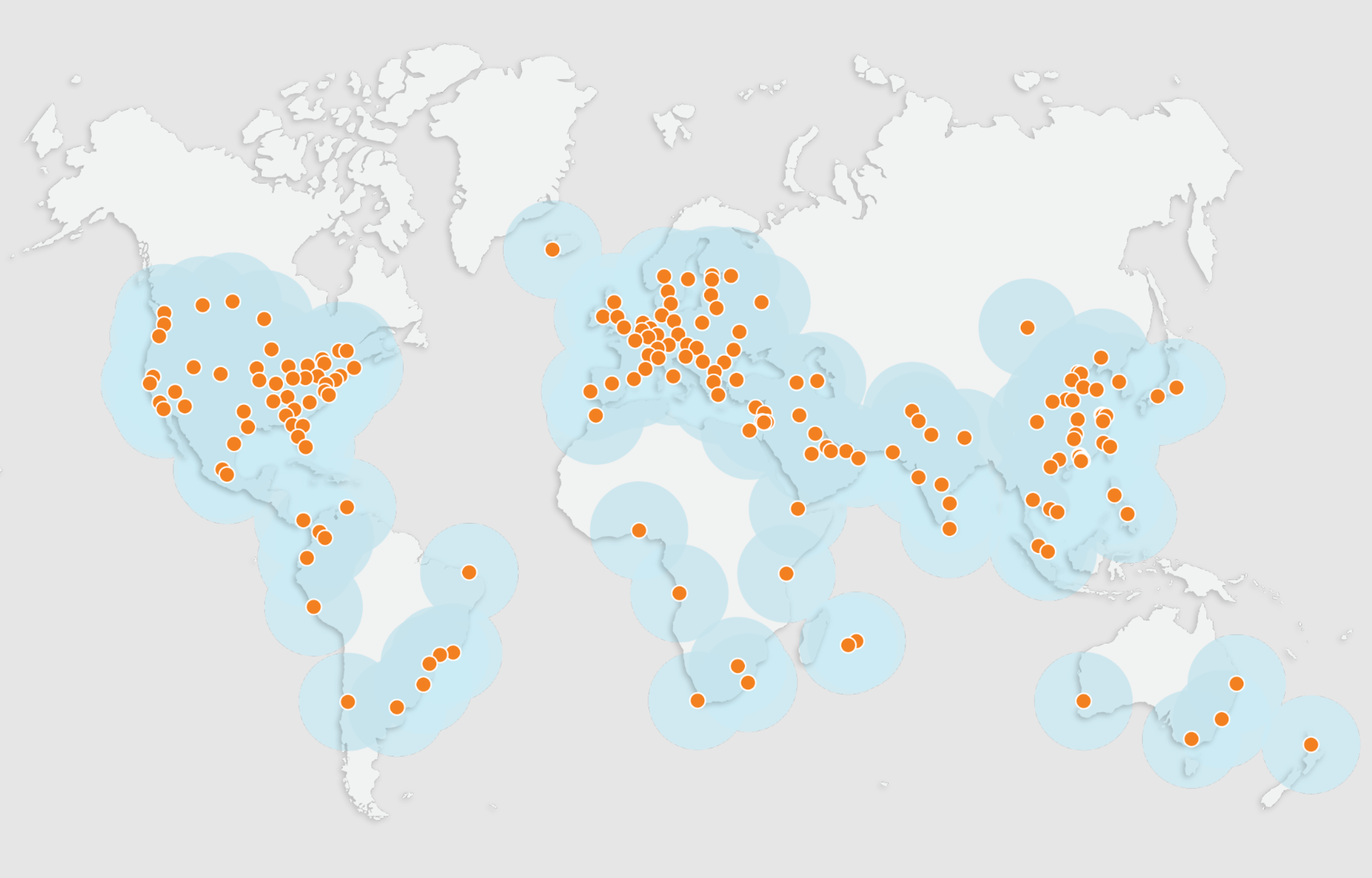
Network & Architecture
If some of these terms sound confusing, don’t worry - I’ll break them down right after this.
The pain points of a traditional single region + CND/LB architecture are high cross continent RTT(Round Trip Time), expensive outbound bandwidth, and inconsistent cache hit.
Cloudflare uses Anycast to announce the same ip to 300+ PoP,TLS/WAF/cacheing aall run on the frist hop, while Argo and Cloudflare's private backbone handle the origin fetch.
What’s PoP?
A PoP(Point of Presence) is basically an access point to the network.
You can think of a Pop as a bundle of edge equipment that an ISP or Cloudflare installs in a city or inside a data center: rouers, switches, CDN cache server, firewalls / WAF, DNS and Anycast entry points, Cloudflare Workers, and the edge gateways for services linke D1 and R2.
All of that together behaves as a single “node” from the outside - that’s what we call a PoP.
You shouldn’t think of a PoP as a traditional, big “origin data center”. It’s more like a logical edge entry point to the network: loser to users than a regional data center, more numerous, and more widely distributed.
If you like analogies: the regional data center is the big logistics warehouse, and the PoP is the local pick up station. Your packets don’t go all the way to the main warehouse first; they get dropped off at the nearest pick-up point.
Combined with Anycast, Cloudflare simply announces a block of IPs from a large ring of PoPs, and your traffic is “pulled” to the PoP that is closest in network terms.
What’s Anycast?
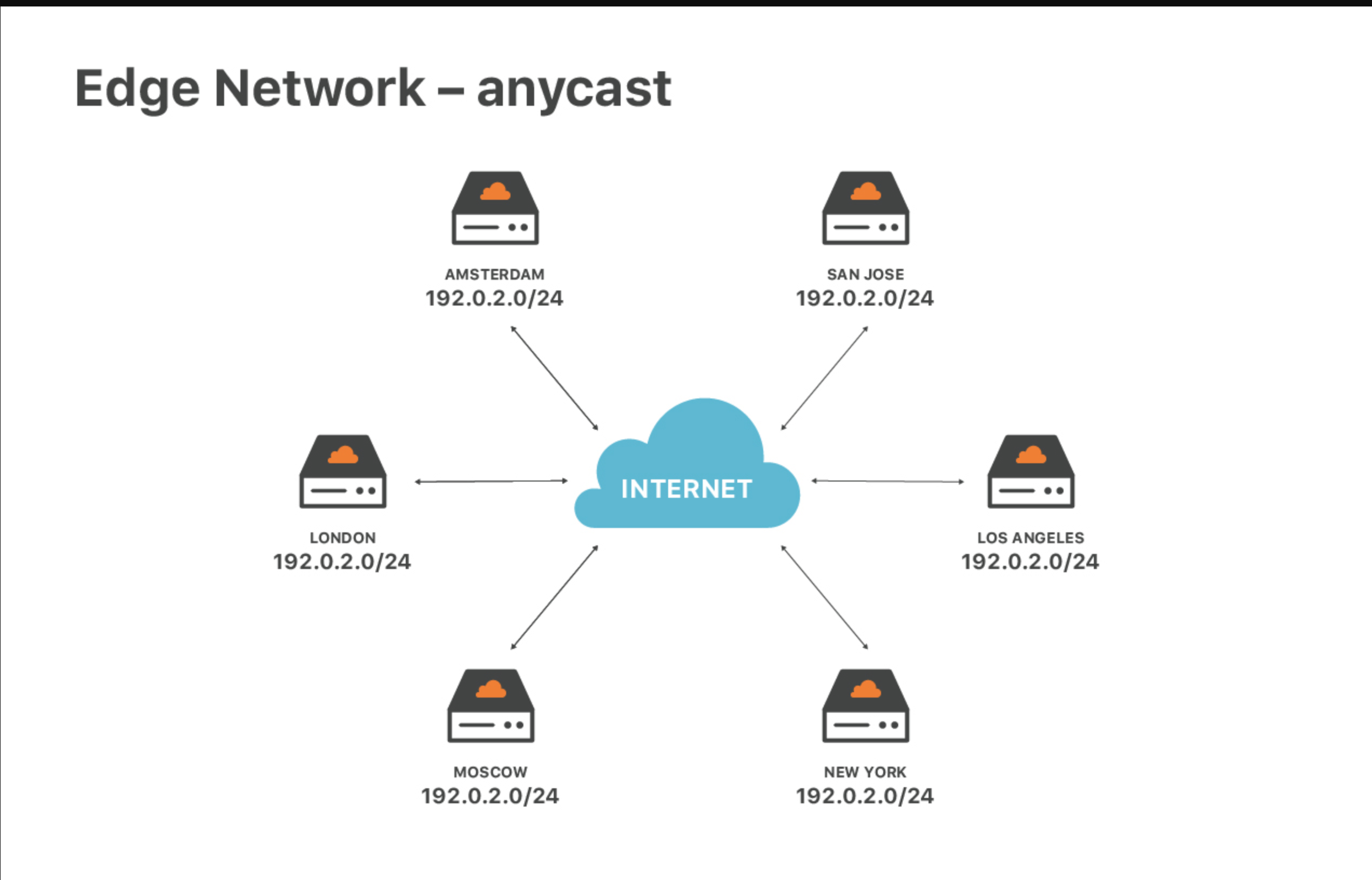
Anycast is a technique where the same ip is served from multiple nodes. When a user sends a request, the network automatically routes it to on of those node, usually the one that is closest in network terms.
As an example, the traditional model is unicast. You might have an origin server in the US with a single IP address, say 1.2.3.4. All requests from around the world are sent to 1.2.3.4, so every request eventually has to travel all the way to that one data center.
With Anycast, Cloudflare instead runs your service across many edge PoPs around the world. All of these PoPs advertise the same IP prefix via BGP (the routing protocol that glues the internet together). When you connect to that IP, routers on the internet choose the lowest-cost path and send your traffic to the Cloudflare PoP that is closest in terms of network topology — not necessarily the one that is physically nearest.
In Cloudflare’s setup, once you onboard your domain (by changing the NS records), Cloudflare assigns your site a set of Anycast IPs, such as 104.x.x.x or 172.x.x.x. These IPs exist at every Cloudflare edge PoP worldwide. A user in the US will be routed to a nearby US PoP, a user in Europe will hit a European PoP, and a user in China will be sent to the nearest reachable Cloudflare PoP, depending on their ISP and which international exit they go through.
Cloudflare’s documentation puts it very simply: Anycast IPs are used to distribute traffic across the Cloudflare network — they speed things up and, at the same time, provide built-in DDoS protection.
What’s Worker?
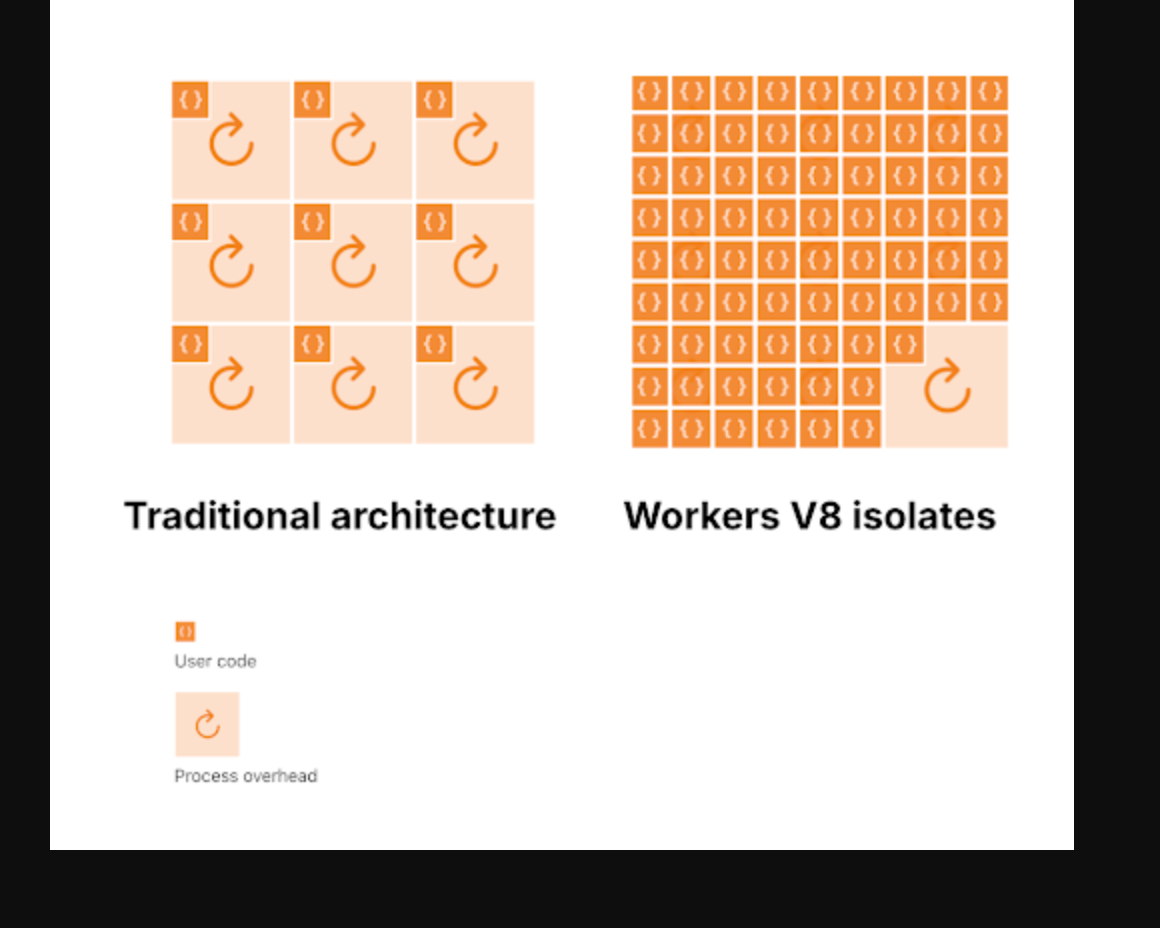
A Cloudflare Worker is a small piece of code (usually JavaScript or TypeScript) that runs on Cloudflare’s edge PoPs. It sits between the client and your origin, so it can intercept, modify, or even generate requests and responses on the fly.
In the CDN era, a PoP was mostly just a transit and caching node. With Workers, the PoP itself becomes programmable. You can run custom logic like auth, routing, A/B testing, or API aggregation directly at the edge, and in many cases you don’t even need a traditional backend server anymore.
What’s Cloudflare Backbone Network?
A simple way to pic it is that Cloudflare has built its own “global highway”.
It runs Pops and data centers in hundred of cities, and traffic between those PoPs doesn’t just bounce around the public internet. Instead, Cloudflare uses a lot of leased and owned fiber/dark fiber to connect them into a private, high bandwind, low-jitter backbone network.
-
Internet = small city stresss full of traffic lights.
-
Cloudflare Backbone Network = private ring of high speed highways.
This is where the “network + compute integration” we mentioned earlier really shows up. Cloudflare providers storage and data services like D1, R2, and KV, and they can talk to each other over Cloudflare own backbone instead of going out over the public internet. That Saves a lot of egress cost and, more importantly, makes things much faster.
What’s Argo?
Argo is a paid feature on top of the free building blocks we’ve talked about so far (Anycast, PoPs, the global backbone, and so on).
Cloudflare’s own analogy goes like this:
-
“Normal routing” is like using a paper map and picking roads just based on distance.
-
Argo Smart Routing is like using Waze or Gaode: it looks at real-time traffic conditions and picks the fastest route right now.
In the model we’ve been building, it’s easier to think about it this way:
-
Anycast makes sure user traffic is pulled into the nearest Cloudflare PoP. Up to that PoP, path selection is decided by the public internet’s BGP routing.
-
From that point on — PoP → origin — Anycast doesn’t care which network you take. By default, traffic follows regular public BGP routes, and quality is “best effort”.
-
Argo steps in at the PoP and tries to choose a better path over Cloudflare’s own private backbone: it carries your traffic across Cloudflare’s network to an egress PoP near your origin, and only then does a short hop back to your server.
In other words:
-
Anycast does “user → edge”.
-
Argo optimizes “edge → origin”.
In my own tests, Argo does improve latency and stability on some routes, but aren’t always dramatic or consistent.
Route
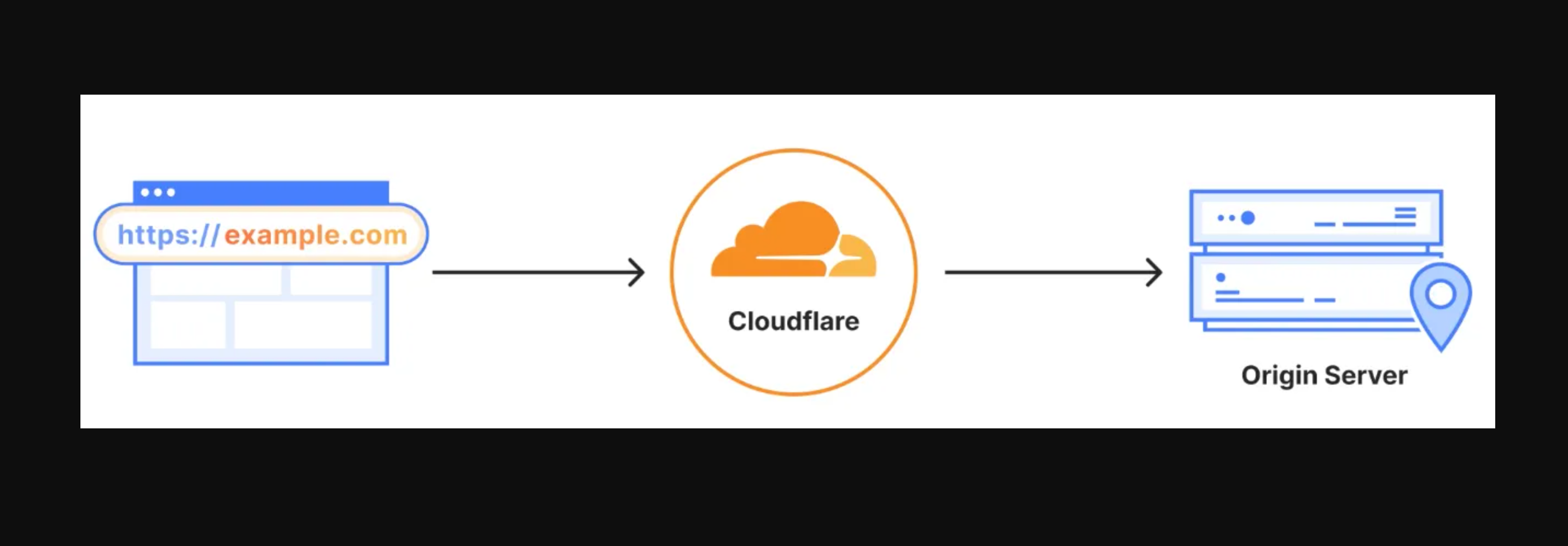
Route 1: Traditional network setup (cloud VM + Nginx/ALB + CDN)
Path
User → public CDN → ALB/Nginx → application/service → back to user
Latency (rough numbers)
Same continent: 50–150 ms RTT
Cross-continent: 180–300 ms RTT
(Depends heavily on public internet paths and CDN-to-origin routing.)
Route 2: Cloudflare + origin (reverse-proxy acceleration)
Path
User → Cloudflare Anycast edge (TLS/WAF/cache/Argo optional) → origin/ALB → internal services → back to user
Latency
Same continent: 20–80 ms
Cross-continent: 120–220 ms
(Lower if the response is served from cache; higher when a full origin fetch is needed.)
Route 3: Cloudflare + Workers (edge rendering / middle layer)
Path
User → Cloudflare edge (Worker running Next.js / Pages Functions) → back to user
Latency
Same continent: 10–40 ms
Cross-continent: 40–120 ms
(Most requests are handled entirely at the edge; only a small portion needs writes or origin calls, which are slightly slower.)
Data and Infra Advantage
Everything above is about Cloudflare’s advantages at the network layer, but the real upside is on the database and backend infra side.
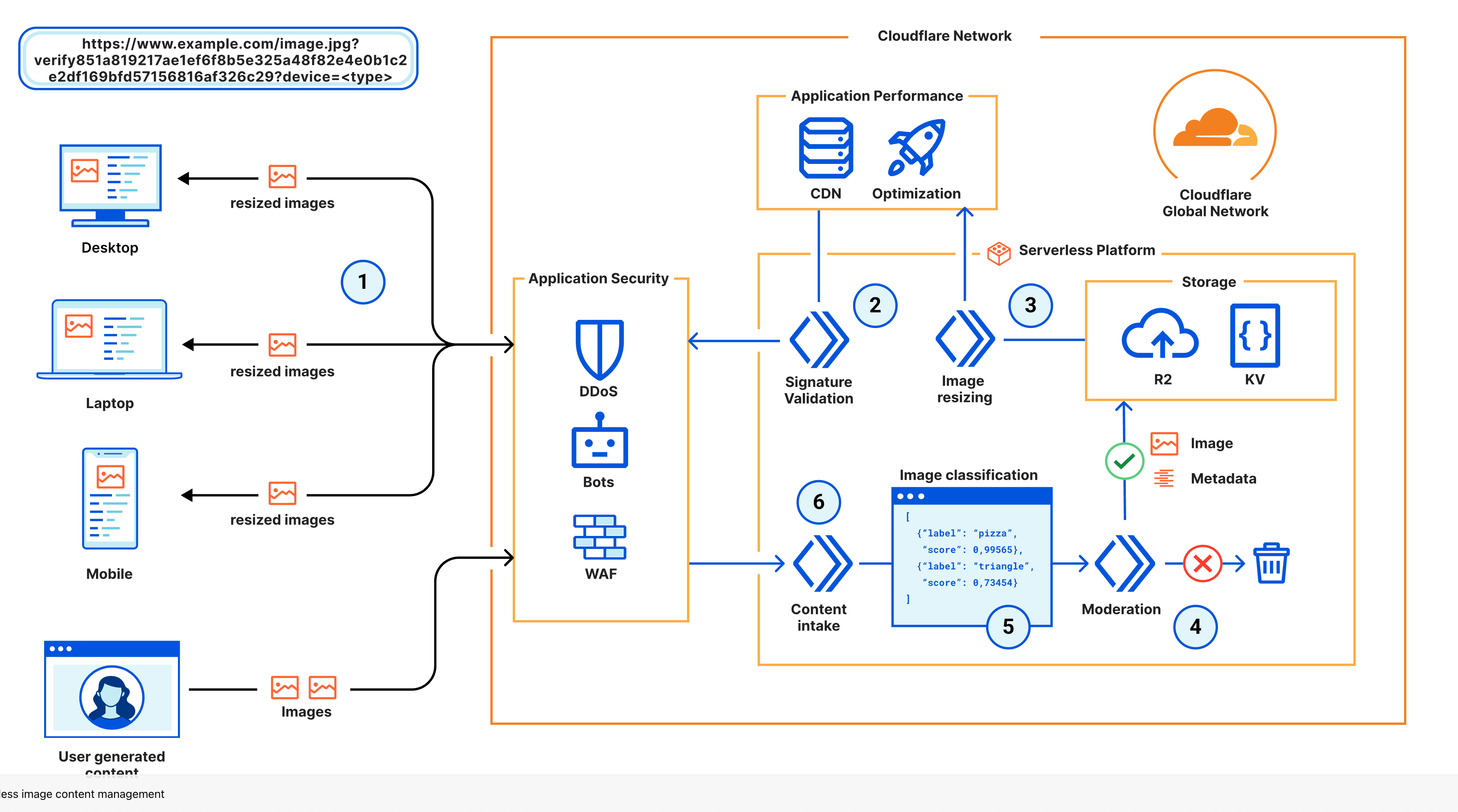
Why does data need to be tied to the network?
The “close to the user entry + backbone to origin” model we discussed earlier solves the request routing problem. But if your data still lives in a single region database, writes across continents and consistency issues will still block you.
Cloudflare’s answer is to move the data layer closer to the PoPs as well:
-
KV / Cache → pure cache
-
D1 → lightweight relational database
-
R2 → object storage
-
Durable Objects → ordered state with a single writer
-
Queues / Cron → event driven glue
The key idea of the whole system is:
database edge gateway → Cloudflare backbone → origin
without going over the public internet.
Component breakdown
Workers KV / Cache API
Very low cost key value cache at the edge, with long TTL and high hit rate.
Useful for fragment caching, feature flags, and configuration.
D1
A relational database with SQLite semantics and automatic replication.
Latency is driven by the PoP that is closest to the user, so you do not need to build your own read write splitting.
The downside is that it is still in Beta or Preview, with limits on throughput and SQL features.
R2
Object storage whose main selling point is zero egress fees.
Reads and writes from Workers or Pages stay inside the Cloudflare network and are almost free.
For media, static assets, and user uploads it can be cheaper than an S3 +
CDN setup.
Durable Objects (DO)
Each key maps to one instance of your logic that processes requests in order.
This is good for rooms and sessions, counters, and de duplication.
You can think of it as a small stateful service for each key.
Queues and Cron Triggers
These complete the asynchronous story.
Together with Workers they give you task queues, retries, and delayed jobs.
Availability and high concurrency
Backend engineers always care about availability and high concurrency, but in the Cloudflare ecosystem many of the hard parts are handled by the platform.
-
Redundancy at the entry layer
Anycast is naturally active in many locations.
If one PoP goes down, traffic automatically moves to the next one.
TLS, WAF, cache, and Workers all run at the edge, so you avoid hot spots in a single region. -
Redundancy at the data layer
D1 and R2 keep multiple replicas for you, so you do not need to manage a primary and replicas yourself.
KV replicates across PoPs and works well for read heavy workloads. -
Handling write hot spots
Durable Objects let you send all writes for a hot key into one instance, which avoids race conditions and double writes.
Concurrent reads can use KV, R2, or D1, and only write back the result to the Durable Object. -
Horizontal sharding
The Durable Object key is a natural shard key.
You can split by user, room, or tenant so that one key does not block all throughput.
For D1, you can split databases or tables by tenant or by logical area. -
Load testing strategy
Logic at the edge can amplify traffic more than a centralized service.
You should do burst tests locally with tools likeminiflareorwrangler dev, and then use a load testing tool to hit PoP entry endpoints and watch the latency of Durable Objects and Queues. -
Degradation paths
If a KV read fails, fall back to D1 or R2.
If a Durable Object times out, use idempotent retries or send work to a queue.
If a queue consumer fails, rely on automatic retries and dead letter queues so that you do not lose events during peak traffic.
Caveats and trade offs
The ecosystem is not magic. There are real limitations:
-
D1 does not yet support transactions, triggers, or most advanced SQL features.Capacity and queries per second are limited.
-
CPU time and memory are limited. Long tail logic must be split into Durable Objects or Queues, and heavy CPU or IO workloads do not fit well.
-
Observability is still in progress. Logpush and Analytics are useful but not cheap. If you want full distributed tracing or APM level visibility, you will probably need to combine several tools yourself.
-
Migration and lock. KV and Durable Objects follow a Cloudflare specific model. If you later want to move to a public cloud database or Kubernetes, you will need an abstraction layer.
Cost
For the same amount of traffic, Cloudflare’s “edge + internal network” pricing model is very friendly for overseas facing sites, but the actual effect still depends on your business pattern.
Below is a coarse comparison, using the free or entry level tiers that small teams usually pick. Prices will vary by region and plan.
Item | Cloudflare | Vercel | AWS (CloudFront + Lambda@Edge + S3 / RDS) | Traditional self managed cloud (CDN + ALB + ECS or DB) |
|---|---|---|---|---|
Entry and network | Anycast is free. Basic WAF and DDoS protection are free. Argo is billed separately. | Pro plan is billed. Edge Functions are included in the request based pricing. | CloudFront is billed by data transfer and requests. WAF is billed separately. | CDN and ALB are billed by bandwidth and requests. WAF is billed separately. |
Dynamic compute | Workers free tier includes 10 million requests per day. Beyond that you pay per request and CPU time. | Edge Functions are billed by number of executions and execution time. | Lambda@Edge is billed by invocations and duration. | ECS or virtual machines are billed per instance and require your own operations work. |
Static and storage | R2 has free egress to the public internet. Storage is billed by usage. KV is very cheap. | Static hosting is included in the plan, but storage and bandwidth are limited. | S3 storage is cheap but egress is expensive. | Object storage and bandwidth are billed by usage. Cross region egress is expensive. |
Database | D1 is cheap but still in preview with limited features. Durable Objects are billed by usage. | KV and Blob storage are the main options. There is no managed relational database. | RDS has full database features but is relatively expensive. Cross continent performance depends on acceleration. | Self hosted or managed databases require your own backup and high availability solution. |
Observability and logs | Basic Analytics is free. Logpush is billed by volume. | Built in monitoring is available. Logs are included only in higher tiers. | CloudWatch is billed by log volume and metrics. | Third party solutions or self hosted tools are needed and require operations work. |
Overall cost at low traffic | Very low, suitable for overseas facing sites and read heavy workloads. | Great developer experience for the frontend. Cost is acceptable for small or medium traffic. | Each part is billed separately. Egress and WAF can become significant cost drivers. | Requires engineering time for operations. Monthly fixed costs are high. |
In practice there is almost nothing to overthink at small scale. When your project is small and the bundled assets are under 3 megabytes, you can run on Cloudflare for free. Even after you go beyond that, the five dollar per month plan is more than enough to support a serious small business.
Once your traffic grows, the cost difference between Cloudflare and more traditional setups can reach hundreds of times.
Development speed
Next.js is now a full stack framework. When you combine it with Cloudflare’s integrated products, you can bring the frontend, the middle layer, and deployment into one place and avoid a lot of classic pitfalls.
In practice, the easiest way to do this is to use opennextjs/cloudflare.
What is OpenNext?
OpenNext is an open source adapter and build toolchain that lets you run Next.js outside of Vercel and host it yourself.
It takes the output of next build and turns it into bundles that can be deployed directly to platforms such as AWS Lambda, Cloudflare Workers, and Netlify, as well as other function as a service or edge platforms.
Why does OpenNext exist? The official best shape for Next.js is to run on Vercel. If you want to run on a serverless stack such as AWS Lambda + API Gateway + CloudFront, or use platforms like Cloudflare Workers and Pages, or Netlify, and at the same time keep support for newer Next.js features such as the App Router, SSR, ISR, Middleware, Image Optimization, and Server Actions, you quickly discover a problem: different communities have built their own “Next.js on AWS or Cloudflare or Netlify” adapters, but Next.js evolves quickly and it is very hard for each separate implementation to keep up over time.
OpenNext is a community project that merges these efforts into one shared standard solution.
I am genuinely grateful for the work that the OpenNext contributors have done. It is very valuable, especially the effort to adapt the Next.js cache model and to integrate the different providers.
If you are interested, you can take a look at my blog. I have a dedicated article that explains how to build an AI application with Cloudflare and OpenNext, and I have already walked through many of the details there.
The blog itself is also running on this stack.
Summary
At a higher level, this is a concrete example of “treating the internet as a compute platform”. Network, compute, and storage are pushed out to the global edge, so small teams no longer need to rebuild VPCs, Kubernetes, and complex active active setups. They can still get something close to a big company infrastructure experience at a much lower cost.
The essence of the technology is to hide complexity inside the platform so that product teams can iterate faster and go global faster. Cloudflare + Next.js + OpenNext is one of the most cost effective combinations for doing exactly that today.