3. Core function implementation: push notification
Non-members can read 30% of the article.
Push is the "reawakening engine" of mobile applications and the only channel that can proactively reach users in closed-loop growth. A successful push means that you remind the user to collect coupons when he has just stopped watching TV shows, inform him in advance that takeout is about to be delivered before he rides home, or pull him back to the key process before he decides to leave the product. The real difficulty is not whether the technology stack is good or not, but rather “User Portraits × Appropriate Timing × Valuable Content × Correct Implementation Experience”.
This chapter uses the Expo technology stack as the main line to build a simple but complete push system from 0 to 1.
1. Push architecture: APNs, FCM and Expo Push Service
Mobile push involves multiple roles: the device and operating system are responsible for receiving, the native push gateways provided by Apple and Google are responsible for transmission, Expo Push Service stands in the middle and does protocol adaptation for us, and the business server is responsible for the decision-making of "what to send and to whom". Understanding the division of labor in the link is the prerequisite for our subsequent positioning of problems and planning architecture.
Let me first describe the process of native writing: In iOS, APNs is the only legal system push entrance. When the application is started for the first time, it will register with the system, and the system will return a device token. The server needs to carry the APNs certificate or p8 Token Auth to send a push request to Apple's gateway, and Apple will deliver the message to the target device. The entire process uses TLS, and Apple also provides additional capabilities such as VoIP and Live Activities.
Android is based on Firebase Cloud Messaging (FCM): the client interacts with Google Play services to obtain the registration token, and the server fills in the Server Key to call the HTTP v1 API. It supports sending notifications directly to the system for rendering, and also supports only transmitting data and letting the application decide on its own presentation.
Expo Push Service is equivalent to building a "distribution platform" on top of the two. What the client obtains through expo-notifications is not the APNs or FCM token, but the Expo Push Token. Your server sends the push request to Expo, which then routes the message to APNs or FCM, handles batch sharding, rate limiting and retries, and uniformly returns error codes to prevent us from directly facing each company's specifications.
The link looks roughly like this:
Client (expo-notifications)
   | Register and get Expo Push Token
   v
Business server (storage token/trigger push)
   | Call Expo Push API
   v
Expo Push Service (verification/sharding/retry)
   | Forward to APNs / FCM
   v
Target device (system policy determines presentation)
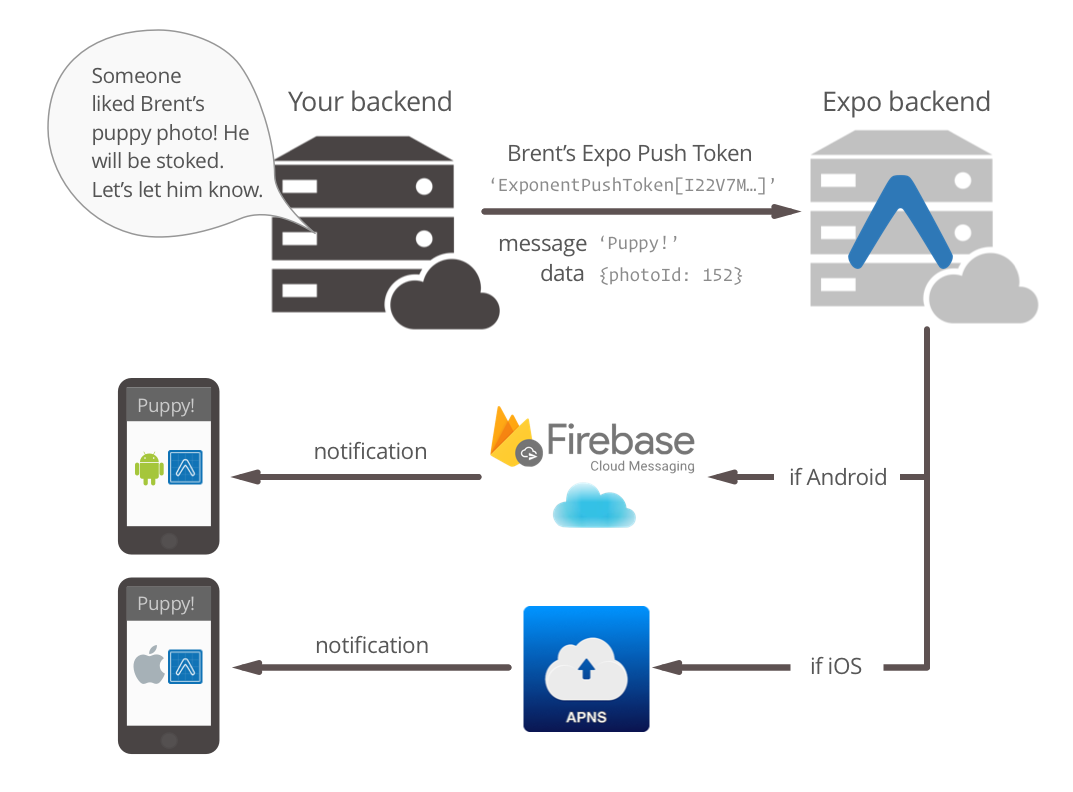
In real projects, the most overlooked points on the link focus on three aspects.
- Token life cycle: The same person may use two mobile phones at the same time and switch between different accounts. If tag binding and expiration are not done properly, it will not be pushed to the correct mobile phone.
- Environment Isolation: Once development, pre-release, and production certificates or
Server Keyare mixed, it will be an accident for test students to reach all real users with one click. - Network Reachability: Cross-border network jitter will make Expo/FCM inaccessible. Preparing the connectivity detection script in advance can save half a day of troubleshooting time.
2. Platform credentials and permission configuration
The reachability of push first depends on whether the credentials are correct and whether the permissions are declared in advance. We can install the dependencies first and manage the configuration in one place:
npx expo install expo-notifications expo-device expo-constants
// app.config.ts
export default {
  plugins: [
    [
      'expo-notifications',
      {
        icon: './assets/notification-icon.png',
        color: '#4f46e5',
        mode: process.env.APP_ENV === 'production' ? 'production' : 'development',
        sounds: ['./assets/sounds/order.wav']
      }
    ]
  ],
  ios: {
    supportsTablet: false,
    infoPlist: {
      NSUserNotificationUsageDescription: 'We will push you important messages such as order progress, discount reminders, etc.'
    }
  },
  android: {
    googleServicesFile: './android/app/google-services.json'
  },
  extra: {
    projectId: process.env.EAS_PROJECT_ID
  }
}
Subscribe to unlock the full article
Support the writing, unlock every paragraph, and receive future updates instantly.
Comments
Join the conversation
No comments yet. Be the first to add one.