I’ve noticed something interesting recently.
The market seems to have developed an almost irrational level of excitement around OpenClaw.
That’s not entirely surprising. Projects like OpenClaw are rare. It manages to sit at the intersection of many different interests at once:
-
model providers
-
platform vendors
-
course creators
-
developers
-
hardware vendors
-
influencers (KOLs)
When a project aligns incentives across this many groups, attention spreads quickly.
The project itself is genuinely valuable. Technological progress is always welcome. But when too many incentives converge at the same time, something predictable tends to happen:
The market begins moving faster than the technology.
People start competing before the underlying system has fully matured. The result is an ecosystem that grows quickly, but somewhat chaotically.
And the cost of this early chaos is usually paid by the same group: curious users who simply want to try new tools.
They encounter:
-
enormous token consumption
-
hours of debugging
-
fragile workflows
-
confusing configuration
So this article is an attempt to slow things down a bit.
I want to share several practical approaches for tuning OpenClaw, so that both developers and ordinary users can get better results while spending fewer tokens.
The Biggest Misunderstanding About Agents
A common assumption people make is this:
Agent = automatically becomes smarter
But the reality is closer to this:
Agent = mechanisms + prompts + tools
An agent system does not magically become intelligent on its own. Without architectural constraints, it usually evolves into something else entirely:
A messy automation system.
Not a reliable assistant.
What Actually Happens in an OpenClaw Workspace
When you open a typical OpenClaw workspace, you’ll often find:
-
messy Skills
-
hundreds of Markdown memory files
-
inconsistent configuration
-
duplicated environments
Here’s a simple example.
I currently have 8 workflows.
-
4 downloaded from ClawHub
-
4 written by myself
The four I wrote launch a browser with profile Profile-xxx.
The other four launch a debugging browser.
Immediately we have a problem.
Ideally:
-
the browser profile should be consistent
-
multiple Skills should reuse the same browser instance
But instead we end up with fragmentation.
Another issue appears at the runtime level.
Many Skills ship with their own:
node_modules
_cache
Over time, OpenClaw begins consuming a surprising amount of runtime memory.
Then there’s Memory.
The long-term memory folder may contain hundreds of Markdown documents. Without embeddings configured, these files are often injected directly into prompts.
The result is predictable:
Huge context windows.
Huge token bills.
This Is Not the Assistant I Expected
The assistant I want is closer to Jarvis.
My Claw is called Echo.
The name comes from the Go framework, but the idea behind it is simple. I want it to help with things like social media operations. That’s not my strongest area.
Ideally Echo should behave like a quiet, competent partner:
-
consume minimal context
-
stay out of the way
-
complete tasks correctly
-
notify me when it’s done
Instead, many current agent setups behave differently.
They constantly require supervision, correction, and retraining.
So the real question becomes:
How do we actually make Echo smart?
The answer, in my opinion, starts with understanding the core architecture of OpenClaw.
Once we understand the mechanisms clearly, we can design better Plugins and Skills. And the system naturally becomes more reliable.
The Overall Architecture of OpenClaw
This diagram shows the overall architecture of OpenClaw.

But conceptually, the system can be simplified.
OpenClaw is essentially an Agent Runtime + Gateway platform.
User
↓
Gateway
↓
Agent Runtime (Pi)
↓
LLM
↓
Tools / Skills
↓
External Systems
If we break the system down further, the most important layers are:
-
Gateway
-
Agents
-
Sessions
-
Memory
-
Tools
-
Workspace
Together these components create an agent system that can:
-
run continuously
-
call tools
-
store state
Context, Memory, and Retrieval
Three components form the core of OpenClaw’s cognitive system:
-
Session
-
Memory
-
Embedding
They correspond to:
-
short-term context
-
long-term memory
-
semantic retrieval
Session
A Session is essentially OpenClaw’s short-term context.
Technically it is an append-only transcript of conversations.
For a single agent it typically lives at:
agents/main/sessions/*.jsonl
A session record usually contains:
-
user messages
-
assistant responses
-
tool calls
-
tool results
These records accumulate to form the context used for the next LLM call.
But there is an obvious problem.
If we keep appending forever, the session eventually becomes too large for the model’s context window.
OpenClaw addresses this using three mechanisms.
1. Pruning
Pruning removes old tool outputs before an LLM call.
This operation is temporary and does not modify the actual session history. Its purpose is simply to control context size.
2. Compaction
Compaction permanently summarizes older conversation history.
old messages
↓
summary
↓
replace history
This reduces context length while preserving the essential information.
3. Memory Flush
Before compaction happens, important information is written into long-term memory.
This ensures useful information isn’t lost during summarization.
Memory
If sessions represent short-term context, Memory represents long-term knowledge.
OpenClaw’s memory system is intentionally simple.
It is just a file system.
A typical structure looks like this:
MEMORY.md

memory/YYYY-MM-DD.md
This reflects OpenClaw’s philosophy:
-
human readable
-
appendable
-
version controllable
Or as the system philosophy puts it:
Files are the source of truth.
The files themselves are the real data. Other systems simply index and retrieve them.
Memory can be used in two ways.
Semantic Search
If memorySearch is configured:
memory files
↓
embedding
↓
vector index
↓
semantic retrieval
Direct Prompt Injection
If embeddings are not configured:
memory files
↓
direct prompt injection
This still works, but without semantic retrieval.
Large amounts of memory may be injected directly into prompts.
Embedding
Embedding belongs to the memorySearch layer.
Its main purpose is to prevent token explosion caused by long context.
Without embeddings, memory injection can easily lead to:
-
excessive token usage
-
inaccurate context
OpenClaw supports two embedding modes.
Remote Embeddings
Examples include:
-
OpenAI
-
Gemini
-
Voyage
-
Mistral
These require API keys.
Local Embeddings
Local embeddings use node-llama-cpp.
Typical GGUF embedding models include:
bge-small
gte-small
e5-small
Embedding vectors are stored in:
memory/main.sqlite
This database contains mappings between:
text chunk → embedding vector
The original files remain the source of truth. The vector index simply allows retrieval using fewer tokens.
Ability System: Tools, Skills, and Plugins
Tools
Tools are the capability interface exposed to the LLM.
Their execution flow is simple:
LLM reasoning
↓
tool selection
↓
execute tool
↓
return result
OpenClaw provides many built-in tool categories:
-
filesystem
-
runtime
-
web
-
browser
-
messaging
-
memory
-
sessions
-
cron
-
nodes
These tools allow agents not just to retrieve information, but to act on the world.
Skills
Skills operate at a higher level.
They package tools, workflows, and conventions into reusable task modules.
For example:
-
posting tweets
-
collecting trending topics
-
sending emails
In simple terms:
Tools → what the system can do
Skills → how a task is actually done
Tools belong to the system layer.
Skills belong to the application layer.
Personally, I sometimes wonder whether this distinction is unnecessarily complex. Perhaps both could be unified under a single abstraction.
Plugins
Plugins extend OpenClaw itself, rather than extending a specific agent.
Typical examples include:
-
model providers
-
messaging channels
-
external integrations
For example:
-
OpenAI provider
-
Telegram adapter
-
Discord adapter
The key distinction is this:
-
Plugins extend the platform
-
Skills extend agent behavior
One changes infrastructure.
The other changes task execution.
Running Boundaries: Workspace and Multi-Agent Systems
A Workspace is the operational home of an agent.
It usually contains:
-
memory
-
sessions
-
skills
-
node_modules
-
cache
-
logs
You can think of it as the agent’s home directory.
OpenClaw itself is a multi-agent system.
Multiple agents share the same gateway but maintain independent state.
Gateway
├── Agent A
├── Agent B
└── Agent C
Each agent typically has its own:
-
workspace
-
sessions
-
memory
-
tool configuration
Session Scheduling
Simply running multiple agents under one gateway is not enough.
They also need a mechanism to cooperate.
OpenClaw achieves this by allowing agents to manipulate sessions directly.
Examples include:
sessions_list
sessions_history
sessions_send
Sessions therefore become more than conversation logs.
They become communication channels.
This enables:
agent → agent communication
In other words, OpenClaw turns conversations themselves into orchestration primitives.
Sub Agents
A Sub Agent is essentially a temporary agent session created to complete a specific task.
You can think of it as outsourcing a subtask.
Typical lifecycle:
spawn
↓
send task
↓
child agent executes
↓
return result
Sub-agents have two defining properties:
-
short lifespan
-
task-focused execution
They are designed to break complex problems into smaller tasks.
Workflow
Below are several workflows I reconstructed from different perspectives.
Message → Response Out

Tool Call

Scheduled Automation & Cron

Installing Plugins
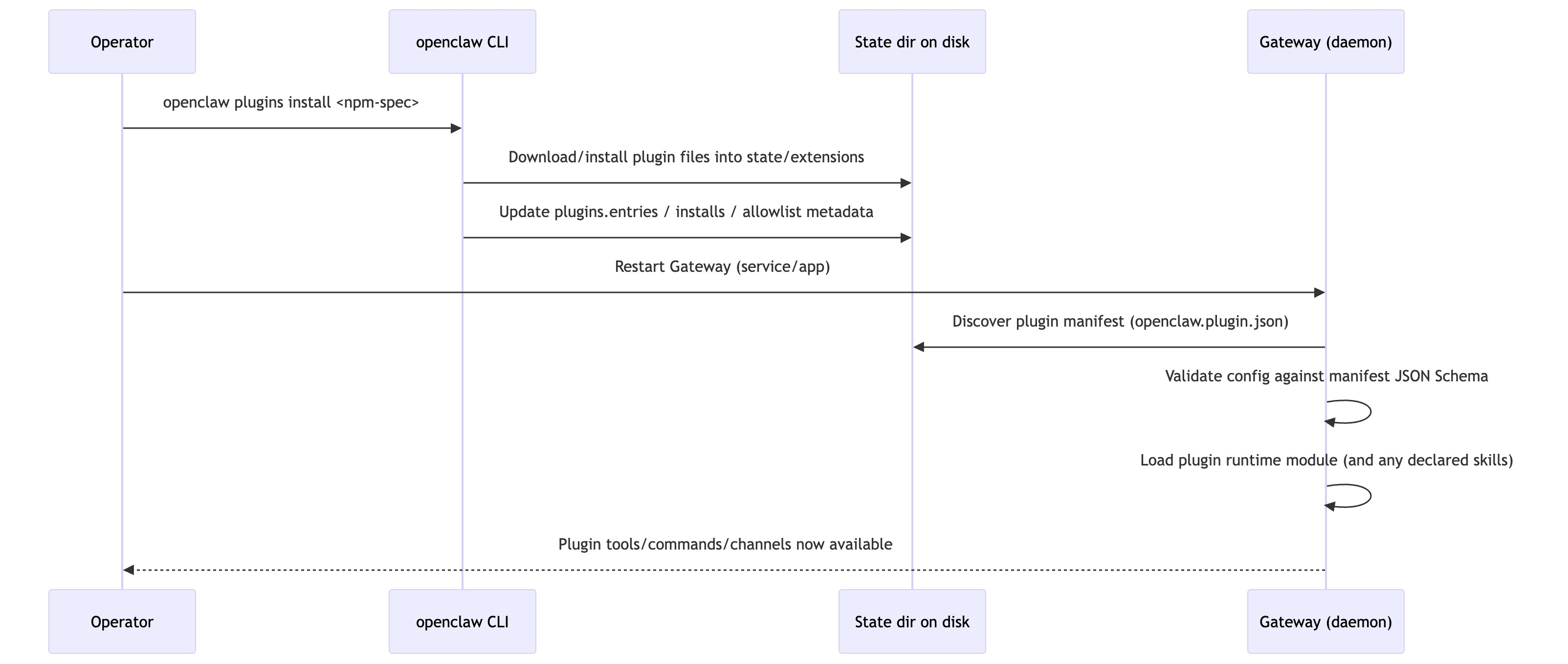
What OpenClaw Actually Is
If I had to summarize the philosophy of OpenClaw in three phrases, it would be:
-
local-first
-
file-based memory
-
tool-driven agents
Instead of assuming everything should run in remote infrastructure, OpenClaw organizes state and capabilities locally.
This makes it closer to an:
AI operating system
rather than a simple:
RAG application
Understanding OpenClaw therefore requires more than asking whether it can retrieve knowledge.
The real question is:
How does the system manage:
-
state
-
context
-
capabilities
-
execution boundaries
From a system architecture perspective, the stack can be viewed as:
Platform
↓
Gateway
↓
Agent Runtime (Pi)
↓
Sessions
↓
Memory
↓
Tools / Skills
↓
External Systems
Higher layers deal with runtime and platform infrastructure.
Lower layers interact directly with capabilities and external systems.
Once you see the system this way, the relationships between Gateway, Runtime, Sessions, Memory, Tools, and Skills become much clearer.
Closing Thoughts
Many companies building AI applications likely have more advanced internal solutions for context management and agent orchestration.
I’ve built similar systems myself.
But OpenClaw did something important.
It took these ideas, packaged them into a usable system, open-sourced it, and put it directly on users’ computers.
And that matters.
In the long run, what truly contributes to the world is not just technical capability.
It’s creativity.
It’s generosity.
And the willingness to give powerful tools back to the community.