4.2 Google Play Billing Ecosystem - Complete Solution to Google Play Payment Implementation
Non-members can read 30% of the article.
In the previous section, we sorted out the ID relationship and implementation practices of Apple IAP. Next, this article will focus on the other half of the sky: Google Play Billing (hereinafter referred to as GPB). In order to obtain sustainable subscription revenue on the Android side, the four links of GPB must be connected: client tickets, Play services, Google Play Developer API, and our own server. This article unfolds in the order of "Structure → Product → Process → Monitoring". The entire article will be slightly longer than the Apple chapter because Google's definition of subscription topology and Base plan/Offer is more complex after Billing 6.
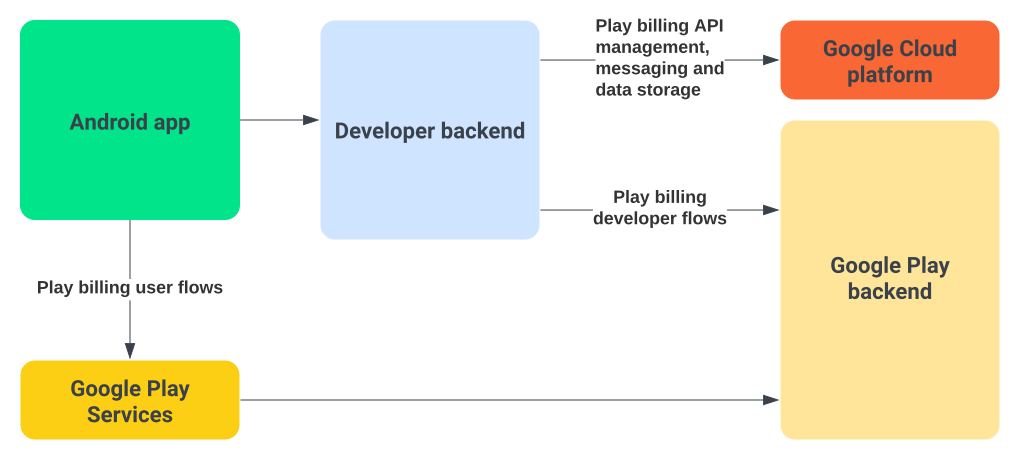
The Three Rings of Google Play Billing
I still think of GPB as a "triple circulation". When you break down the responsibilities clearly enough, the efficiency of troubleshooting will be greatly improved.
- Client (Play Billing Library / Play Integrity): Responsible for pulling products, initiating purchases, getting the
Purchaseobject and handing it over to the server. At the same time, it must callacknowledgeorconsumeafter success. ([Google Developer][2]) - Google Play Services: Play Store App, Play backend, Billing service and Real-time Developer Notifications (RTDN), responsible for deducting payment, generating
purchaseToken, pushing transaction status, and allowing API query history. ([Google Developer][3]) - Server: Receive the
purchaseTokenuploaded by the client, callPurchases.products/Purchases.subscriptionsfor verification, doacknowledge,consume, issue rights, and string together RTDN and reconciliation data.
Code example:
export const finishTransaction: MutationField<'finishTransaction'> = async ({ purchase, isConsumable = false }) => {
  if (Platform.OS === 'ios') {
    await ExpoIapModule.finishTransaction(purchase, isConsumable)
    return
  }

  if (Platform.OS === 'android') {
    const token = purchase.purchaseToken ?? undefined

    if (!token) {
      throw createPurchaseError({
        message: 'Purchase token is required to finish transaction',
        code: ErrorCode.DeveloperError,
        productId: purchase.productId,
        platform: 'android'
      })
    }

    if (isConsumable) {
      await ExpoIapModule.consumePurchaseAndroid(token)
      return
    }

    await ExpoIapModule.acknowledgePurchaseAndroid(token)
    return
  }

  throw new Error('Unsupported Platform')
}
As long as any one of these three links is in debt, it will cause accidents such as "bought but not given" and "refund not received". All IDs in GPB (purchaseToken, orderId, linkedPurchaseToken, profileId, etc.) can be classified according to these three rings. Do not mix them during debugging.
It should be noted that RTDN is configured on Google Cloud, and configuring App, adding sandbox environment, products, and subscriptions is configured on Google Play Console.
Play Console Management and Roles
Google's permission system seems simple, but it actually implies two systems: Play Console role and Payments profile permissions. To make payment work, at least the following must be met:
AdminorRelease Managercan create/publish products; ([Google Developer][4])- Only
FinancialorPayments Managerroles can view income and refund data; - A test account must be added in
Play Console > Setup > License Testing, otherwise sandbox testing will be blocked; - Merchant account (Merchant Center) must pass KYC, and the subscription will be automatically deducted;
Subscribe to unlock the full article
Support the writing, unlock every paragraph, and receive future updates instantly.
Comments
Join the conversation
No comments yet. Be the first to add one.