4.2 Google Play Billing 生态体系 - Google Play 支付落地全解
这是预览内容
非会员仅可阅读 30% 的正文。
上一节我们把 Apple IAP 的 ID 关系与落地实践梳理了一遍,接下来这篇文章就把镜头切向另外半边天:Google Play Billing(后面简称 GPB)。想要在 Android 端获得可持续的订阅收入,GPB 的四个环节必须拉通:客户端票据、Play 服务、Google Play Developer API、我们自己的服务端。本文按照“结构 → 商品 → 流程 → 监控”的顺序展开,整个篇幅会比苹果章节稍长,因为 Google 在 Billing 6 之后对订阅拓扑、Base plan/Offer 的定义更加复杂。
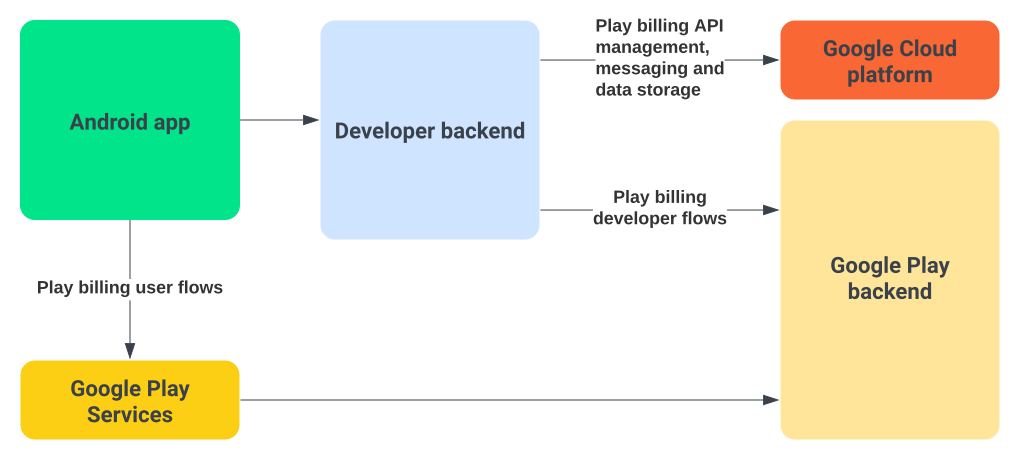
Google Play Billing 的三环
我仍然把 GPB 看成“三环流”。当你把职责拆得足够清楚时,排查问题的效率会大幅提升。
- 客户端(Play Billing Library / Play Integrity):负责拉取商品、发起购买、拿到
Purchase对象并交给服务端,同时要在成功后调用acknowledge或consume。([Google Developer][2]) - Google Play 服务:Play Store App、Play 后台、Billing 服务以及 Real-time Developer Notifications(RTDN),负责扣款、生成
purchaseToken、推送交易状态、允许 API 查询历史。([Google Developer][3]) - 服务端:接收客户端上传的
purchaseToken,调用Purchases.products/Purchases.subscriptions校验,做acknowledge、consume、发权益,并把 RTDN 和对账数据串起来。
代码示例:
export const finishTransaction: MutationField<'finishTransaction'> = async ({ purchase, isConsumable = false }) => {
  if (Platform.OS === 'ios') {
    await ExpoIapModule.finishTransaction(purchase, isConsumable)
    return
  }

  if (Platform.OS === 'android') {
    const token = purchase.purchaseToken ?? undefined

    if (!token) {
      throw createPurchaseError({
        message: 'Purchase token is required to finish transaction',
        code: ErrorCode.DeveloperError,
        productId: purchase.productId,
        platform: 'android'
      })
    }

    if (isConsumable) {
      await ExpoIapModule.consumePurchaseAndroid(token)
      return
    }

    await ExpoIapModule.acknowledgePurchaseAndroid(token)
    return
  }

  throw new Error('Unsupported Platform')
}
这三环只要任何一环欠账,都会造成“买了没给”“退款未收回”这类事故。GPB 里所有的 ID(purchaseToken、orderId、linkedPurchaseToken、profileId 等)都可以按这三环分门别类,调试时别混。
要注意的是RTDN是在Google Cloud上配置, 而配置App、添加沙盒环境、商品、订阅是在Google Play Console上配置。
Play Console 管理与角色
Google 的权限体系看似简单,其实隐含了两个系统:Play Console 角色与**结算中心(Payments profile)**权限。要把支付跑起来,至少要满足:
Admin或Release Manager才能创建/发布商品;([Google Developer][4])Financial或Payments Manager角色才能看收入和退款数据;Play Console > Setup > License Testing里要添加测试账号,否则沙箱测试会被拦;- Merchant account(商户中心)必须通过 KYC,订阅才会自动扣款;
Product 与 Subscription 的组合
会员专享
订阅后解锁完整文章
支持创作、解锁全文,未来更新也会第一时间送达。
评论
加入讨论
登录后评论
还没有评论,来占个沙发吧。